Home Staging Photographer: What They Do and How to Shoot a Home So It Stages Well
What a home staging photographer actually does, how to shoot every room so it stages well, physically or virtually, and when a phone is enough.
Search for "home staging photographer" and you get two things blended together: real estate photographers who shoot homes after a stager has furnished them, and photographers who shoot the frames the staging is built on afterwards, almost always virtually. In 2026 the second kind is the common one, and it changes how you shoot. This guide covers what that photographer does, how to photograph a home so the staging works, and exactly what to hand over to whoever stages it.
What a home staging photographer is
It is not a separate profession. It is a real estate photographer who shoots rooms with the next step in mind: the image will be furnished on a computer, decluttered digitally, or, with physical staging, has to do justice to a stager's work. What changes versus a regular listing shoot is the order of operations and a handful of technical choices.
With physical staging you stage first and shoot second; the photographer arrives when the furniture is in. Virtual staging flips that. You shoot the home as it is, empty or lived-in, and the furniture is added on top of those photos. The photo is the raw material, so a tilted frame, a blown-out window or a stretched wide angle carries into every staged version. Shoot first, stage from the photos, and shoot so the photos can be staged.
How to stage a house for photos
Staging for the camera is not the same as staging for a viewing. The lens sees a narrow slice of each room, so the work goes into what that slice shows. The checklist below is what we ask sellers to do before a shoot; anything left on it can still be removed digitally afterwards.
- Clear every horizontal surface. Worktops, side tables, the windowsill, the top of the fridge. One object per surface at most.
- Take down the personal layer. Family photos, children's drawings, fridge magnets, name plates. Buyers need to picture themselves, not you.
- Halve the furniture in small rooms. A sofa and one chair read as spacious; three seats and a footstool read as cramped. Move the extras to the garage for the day.
- Hide the cables and the bins. Chargers, extension leads, the router, the kitchen bin, the laundry basket. They are the first thing a staged photo gives away.
- Make every bed, plump every cushion. Plain bedding photographs better than patterns; a throw folded at the foot of the bed adds depth.
- Open every curtain and switch on every lamp. Then straighten the lampshades. Mixed bulb temperatures show up on camera, so match them where you can.
- Clear the floor. Rugs straight, shoes away, no pet beds or toys in the frame. Floor is what makes a room look large in a wide shot.
- Style three focal points, not thirty. A bowl of lemons on the kitchen island, a stack of books on the coffee table, a plant in the bathroom. Stop there.
- Check the view through doorways. Photographers shoot into corners and through openings; the room beyond is in the picture too.
- Leave the rest to decluttering. Whatever cannot leave the house in time, from a treadmill to a cat tree, comes out digitally before staging, and the original photo is kept.
How to shoot a home so it stages well
The rules of good real estate photography apply, with a few points that matter more than usual.
Wide angle, no fisheye. 16 to 24 mm on full frame is the safe range. Go wider and the corners stretch, the furniture added later looks warped and the room lies about its size. If you are short on space, back into the hallway before you drop below 16 mm.
Camera at chest height. 1.2 to 1.4 m off the floor, on a tripod. Higher and you see too much floor; lower and the ceiling eats the frame. At chest height there is exactly enough floor to place sofas, beds and tables believably.
Straight verticals. Level the camera and correct perspective in post. Converging walls are the first thing people notice in a staged photo, because the generated furniture follows the room's lines.
Daylight, lights on. Raise the blinds, open the curtains and switch on every light, sconces and cooker hood included. Soft, indirect light is best; avoid hard sun streaming through the windows.
HDR restraint. Bracket three or five exposures and blend them gently, or mix flash with ambient. Avoid the HDR look of halos, grey windows and flat shadows: virtual staging leans on real shadows to ground the furniture.
Corners and doorways. Frame into a corner so two walls and a good stretch of floor are visible; that gives the room depth and tells the stager where things go. Include a doorway or opening so buyers understand how the spaces connect.
One frame per room from the doorway, plus one detail. The doorway frame is the one that gets staged and goes on the listing. The detail (a window, a fireplace, the flooring) documents materials and adds context.
Landscape, 3:2. That is what portals want. Funda accepts only landscape JPEGs between 2160 × 1440 and 4096 × 3200 px and asks that listings open with landscape photos; ImmoScout24 shows cover images in 4:3 and centre-crops anything else. Shoot 3:2 with a little breathing room and you will never fight a crop later.
Tidy what you can, declutter the rest digitally. Bins, cables, fridge magnets, bathroom products, the dog bed. Whatever cannot leave the room during the shoot gets removed digitally before staging.
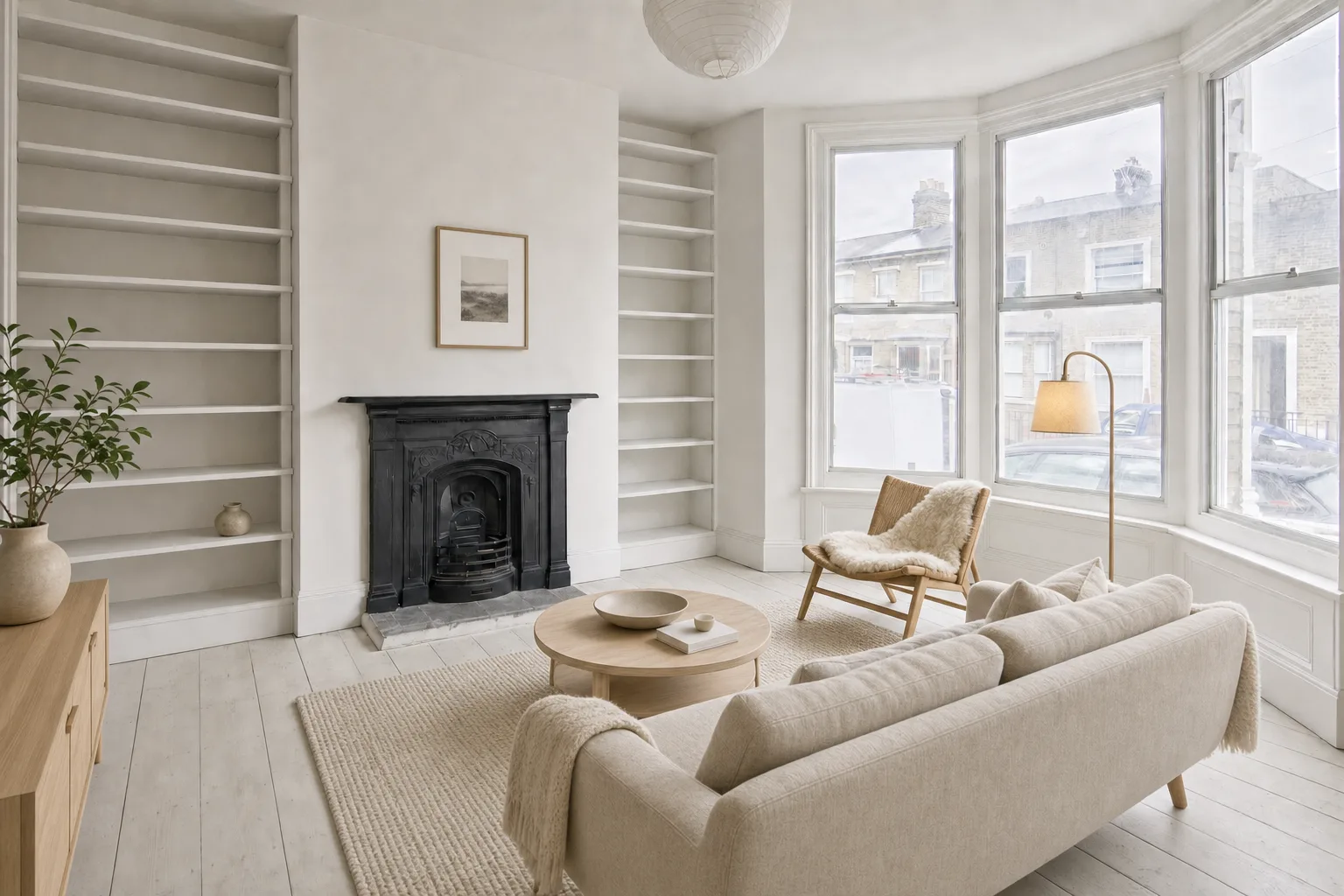
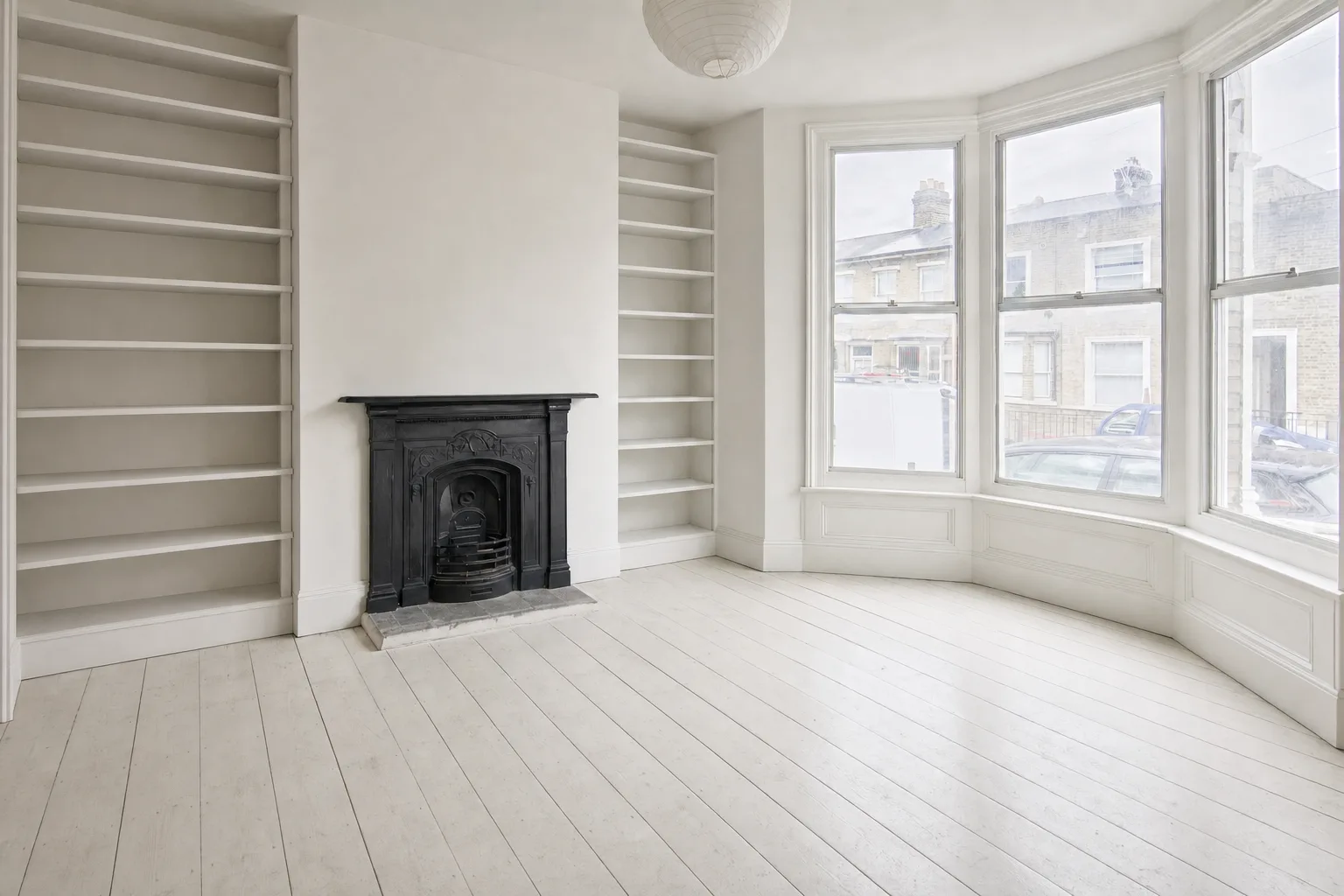
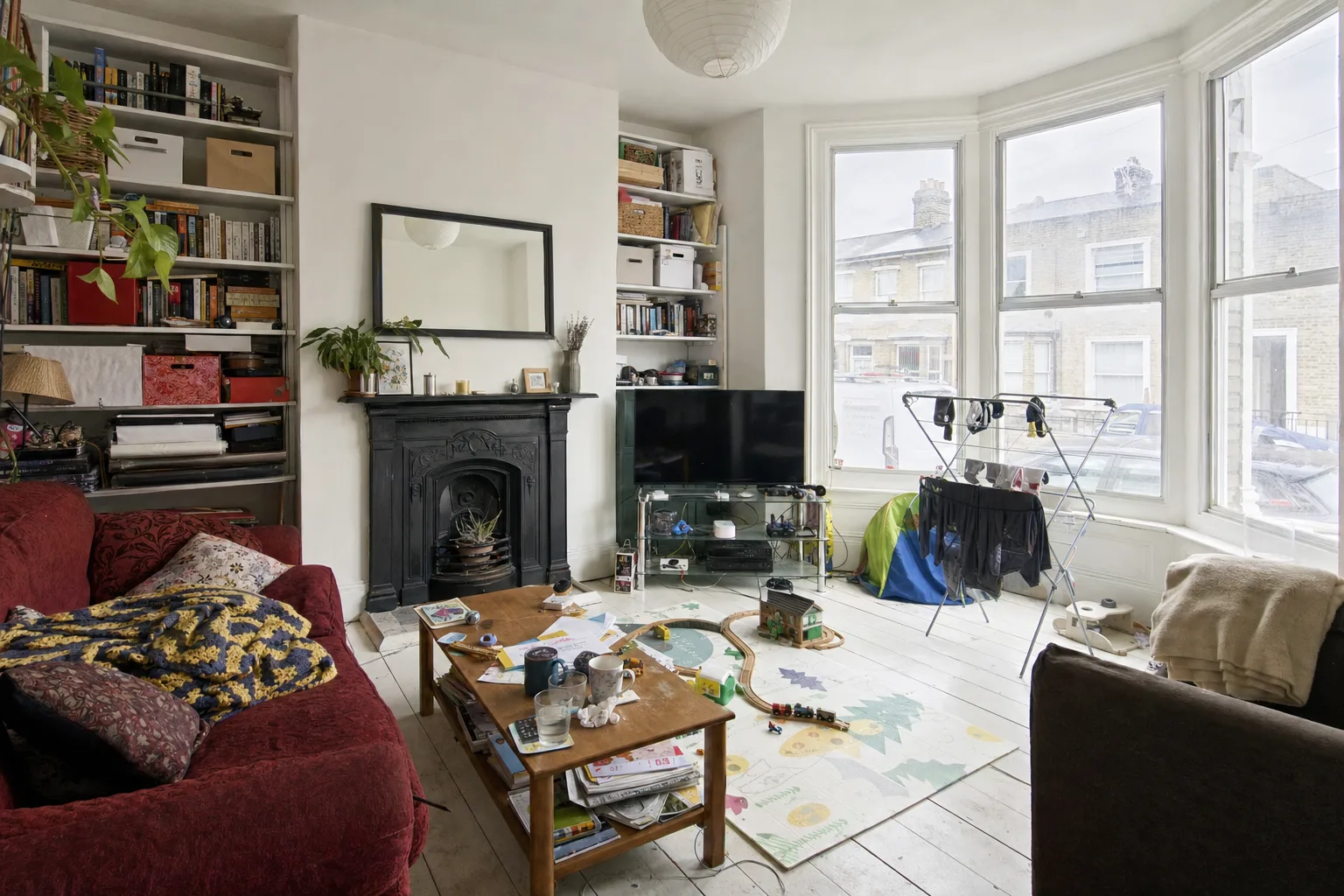
What to send a virtual stager
Send the originals, or the final edit with only colour and exposure corrected, at full resolution: never the compressed version already uploaded to the portal, never the one that went through WhatsApp. No filters, vignettes, watermarks or crops. One clean frame per room, a note on what each room is for (bedroom, office, dining) and the agency's reference style. Twelve Lumens accepts JPEG, PNG, WebP and HEIC up to 20 MB per file, keeps the original beside every version and exports landscape 3:2 inside the sizes portals ask for.
The checklist before you send:
- Full-resolution originals, no filters, no heavy HDR.
- Verticals corrected, horizon level.
- One doorway frame per room, landscape 3:2.
- Intended use of each room noted.
- Blinds up, lights on, personal items out.
- The agency's style or reference images attached.
Is a phone enough, or do you need a professional?
A recent phone shoots stageable photos if you follow the rules above: the 1x lens rather than ultra-wide, the level overlay on, daylight, no filters. The gap to a professional shows in backlit rooms, verticals and resolution headroom.
| Recent phone | Professional photographer | |
|---|---|---|
| Lens | 0.5x distorts; use 1x and step back | 16 to 24 mm with perspective correction |
| Windows | Auto HDR, fine in bright rooms | Bracketing or flash: readable windows, no halos |
| Resolution | 12 MP, just enough for Funda if you do not crop | 24 MP or more, headroom for 3:2 and 2K exports |
| When | Rentals, small bright flats, listing today | Sales, large or high-value homes, backlit rooms |
For a rental or a bright flat, a phone plus virtual staging goes a long way. For a sale where the hero photo decides the viewings, the professional shoot pays for itself.
How photographers add staging to their packages
Real estate photographers already own the moment a listing is born: the shoot. Adding decluttering and virtual staging turns that shoot into a second product. The usual approach is to price it per photo or as a per-listing pack on top of the photography package: the main rooms as a fixed add-on, the rest per image. Because the cost with AI is cents per image inside the plan (Pro covers ten listings a month with 50 images each), the margin stays with the studio. The batch workflow, with one custom house style per agency and the agent invited in to mark finals, is on the real estate photographers page.
Where to start
If you have a recent shoot on hand, stage five of your own photos free, no credit card, originals kept. And before publishing, check the virtual staging disclosure rules for the portal the listing is going to.
By Martin Balk, founder of Twelve Lumens · Updated October 19, 2026
See your own listing staged
Upload a few photos and get decluttered, staged versions back in minutes. The first five images are free, no credit card, and your originals are always kept.
Stage 5 images freeMore from the blog
Virtual Staging as a Photographer's Add-On: Workflow and Pricing
How real estate photographers add virtual staging to a shoot: same-day workflow, what to charge per photo, how to hand the set to the agent, the rules.
Remove Furniture from Listing Photos with AI (Virtual Decluttering)
Empty a lived-in room on the photo in one click: upload, declutter every photo at once, keep what should stay, then stage or publish the clean version.
How to Turn a 3D Render into a Photorealistic Image with AI (3 Steps)
Make a clay render, a SketchUp viewport or an old CGI photorealistic in minutes: upload it like a photo, pick a style, render. Same camera, same geometry.
How to Style Your Home with AI in 5 Steps (With Screenshots)
Step by step, with screenshots: photograph your rooms, upload, declutter, try two or three styles and export. About 15 minutes, first 5 images free.
How to Virtually Stage a Whole Listing in One Go (Screenshots)
A real 13-photo listing staged in one sitting: one upload, one house style, one click for every room, a portal-ready export with the disclosure built in.
How Does AI Virtual Staging Work? From Upload to Listing-Ready Photo
How AI virtual staging works, step by step: upload, declutter, pick a style, render in minutes. What changes, what it costs and where it is allowed.
Virtual Staging Pricing in 2026: What It Costs Per Photo, Per Listing and Per Month
Virtual staging costs roughly €0.40 to €40 per image in 2026. What the three pricing models add up to per listing and per month, plus the hidden fees.
Virtual Staging Terms, Explained: A Plain-Language Glossary
Plain-language definitions of 13 virtual staging terms: renders, 2K, house styles, decluttering, disclosure and more, each one quotable on its own.
Virtual Staging Disclosure Rules in 2026: MLS, Zillow, Funda, Rightmove and More
Where virtually staged photos are allowed, what each market expects you to disclose, and a checklist that keeps your listing within every rule.
How Much Does Home Staging Cost in 2026? Physical vs. Virtual, With Real Numbers
What physical, outsourced virtual and AI home staging cost per listing in 2026, when each one is worth it, and the math for a typical 20-photo listing.